Why online safety matters
The internet gives us access to shopping, banking, healthcare services, and the ability to keep in touch with friends and family. But it also opens the door to online scams and fraud, which can target anyone regardless of age, disability, or technical knowledge.
This guide shares simple and practical tips for staying safe online, especially for people who are blind or visually impaired, or who may not be very familiar with using the internet and new technologies.
It is natural to sometimes feel anxious about your online safety. However, with the right knowledge, you can stay safe and enjoy being online and connected with friends, family and the services you need.
Types of risks
Online threats to your security can come in different forms, including:
- phishing - texts, emails, or other online messages designed to look like trusted organisations, and can look like messages about your bank account, tax refunds, and missed deliveries,
- websites - fraudulent websites set up to take your money or security details,
- social media pages - fake prizes, giveaways, profiles, or investment opportunities,
- malware - software that is downloaded to gain access to security details or to damage your device, and
- password theft - use of weak or reused passwords can give scammers easy access to secure accounts.
Many of these risks pose a higher threat to people with visual impairments, as the easiest way to spot them is through visual inconsistencies, such as blurred or low quality logos and graphics, or spelling and grammar mistakes.
Those who rely on assistive technology, such as screen readers, may not pick up on these visual cues. And as scams become more sophisticated, fraudulent websites, emails and messages may still be accessible, thus accessibility alone is not a sign that something is trustworthy.
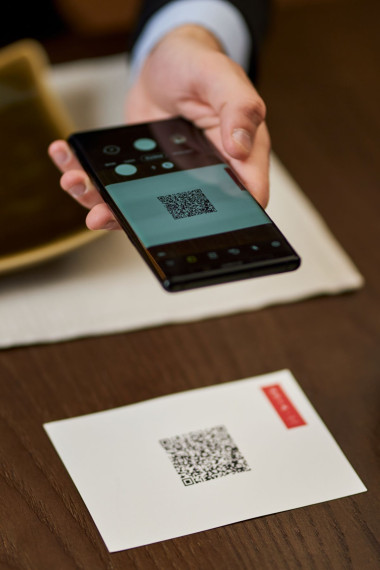
Relying on QR codes also presents a potential risk if it's not clear where the code will take you.
Practical safety tips
Adopting a few simple, safety habits can help you navigate the online world easily and securely.
- Don't panic - Many scam and fraud messages are designed to create a sense of urgency and threaten consequences if action is not taken immediately, the action usually being to click an unfamiliar link, or share a password or your security details. Scammers will try to rush or panic you into taking these actions without thinking them through properly, so it's important to stay calm and think before acting.
- Verify - Do not click on a link in a message, but instead contact the company directly using details you already know, or use the organisations official website and get in touch using a trusted phone number, email address or other contact method. This way you can verify if the message is legitimate before acting.
- Never share security details - Very rarely will a trusted organisation ask for your password or security details, so never share these details.
- Use strong passwords - Create long passwords using a mix of letters, numbers, and symbols, and use different passwords for different accounts. Avoid using your name or birthday or anything familiar to you that could be guessed. You can allow your web browser to save passwords, but this is only recommended if no one else uses your device. You can also download a Password Manager which will keep track of all your passwords and keep them secure, so you don't need to try to remember all your details.
- Keep devices and assistive technology updated - Say yes to official updates on your computer, phone, tablet, screen reader and magnification software. Updates often fix security problems and protect you.
Staying vigilant
- When online shopping and banking, only use trusted retailers and organisations, monitor your bank account activity, and enable banking alerts where possible.
- When using social media, be cautious with who you connect with as scammers can create fake accounts and impersonate other people and organisations, to gain your trust.
- Don't share personal information about yourself - such as date of birth, address, work place, or travel plans - with a person or through a channel you have not verified is genuine.
If something goes wrong
Scams can be very sophisticated and it's not uncommon to make a mistake, but taking quick remedial action immediately can help. If you suspect you have been scammed you should take these steps:
- Stop communicating with the suspected scammer immediately
- Change your passwords.
- Notify your bank or the organisation tha.t you think might be at risk about what has happened.
- Report the incident.
- Ask a trusted person or organisation for support.
Additional advice for blind and VI users
- Recognise adverts. Search results and app stores often place adverts at the top of a results page or screen. Screen readers may read these as if they are genuine results, so always check these and be suspicious if something does not sound right.
- Check website security by looking out for the ‘https’ at the beginning of a website address or a padlock at the start of the address, both of which indicate a secure website.
- Agree on a safe word or phrase with close family or friends, and ask for this if you ever get a suspicious message or phone call asking for urgent money.
- If you know or suspect something is a scam or fraud, it is best not to engage with it at all if you can avoid it. Often responding to a scam message or phone call can make you a further target, as the scammers now know there is a real person they can continue to reach out to under different guises.
Key takeaway
Online safety is not about avoiding technology altogether. It's rather about knowing how to spot the warning signs so you can use it safely and confidently.
With the right knowledge, blind and partially sighted people can enjoy the benefits of being online while reducing the risk of scams, fraud, and cybercrime.
Where to get help
Scammers target everyone, and asking for help is one of the best ways to stay safe and protected. If you are ever unsure, stop and ask a trusted friend, family member, or assistive technology support service.
If you think you have been scammed, you can report it to Action Fraud on 0300 123 2040 or visit the website below.